Docker lets you easily deploy, develop and ship your software application. Any application that is run by Docker will start and run the same way, everytime on any machine. This prevents the problem of: “My application works on my computer but not on theirs!”.
Docker is based on the concepts: images and containers. Images are everything needed to run the application. This includes the source code, dependencies, libraries, and a file system. See an image as a template for running a certain application. A container is an instance of an image. (Your application running as a process) You can run multiple isolated containers from the same image.
Docker containers are often compared to virtual machines since this is what Docker replaces and improves upon. The diagram below shows how Docker is different to a virtual machine.
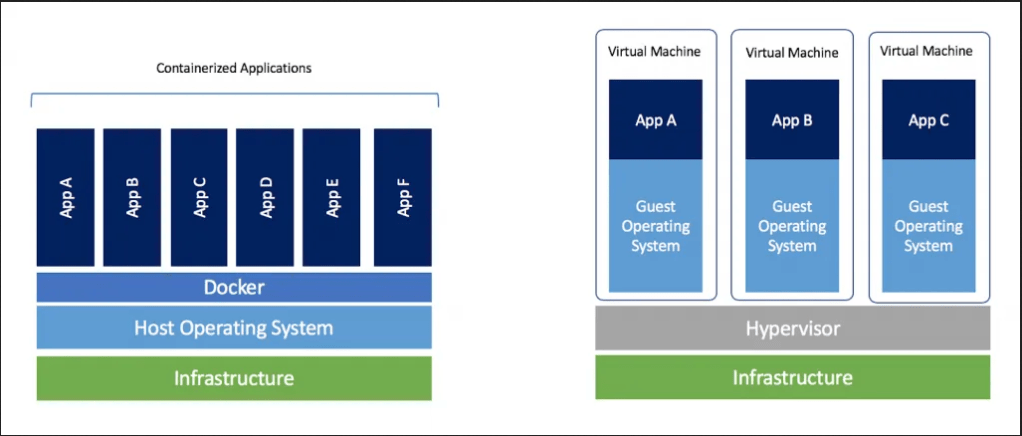
As you can see, Docker replaces the need for a hypervisor and instead shares the Host operating system across containers. Note that if your containers are using Windows the host OS must also be Windows. You might be wondering how can each container still have it’s own file system if it’s sharing the host OS?
Docker uses AuFS, a layered file system to allow containers “their own” file system.
“AuFS is a layered file system, so you can have a read only part and a write part which are merged together. One could have the common parts of the operating system as read only (and shared amongst all of your containers) and then give each container its own mount for writing.” – Cochrane, K., & Ahmed, H. (2019, Nov 19). How is Docker different from a virtual machine? Retrieved September 27, 2020, from https://stackoverflow.com/questions/16047306/how-is-docker-different-from-a-virtual-machine/16048358
Some of the benefits of Docker containers are
- Lightweight
The host only runs one operating system and there is no need for a hypervisor. You can also run multiple containers off one image meaning the image is only present once and each container is nothing more than a process running in the background. - Portable
Images are guaranteed to run your application the same way on any environment since everything needed for the application is present and working. - Easy to use
Docker makes it easy to containerize your application on any OS.
Getting started with Docker
In order to add Docker to your application you will need to install Docker desktop. Once installed you can start setting up an image of your application. To do so, create a file in the root of your applications filesystem and name it Dockerfile. This file specifies how to create your an image for this application. A sample Dockerfile for a node application can be found here. As you can see from this sample file, it holds a sequence of commands Docker needs to complete in order for your application to run.
After setting up the Dockerfile you can run the following command (from within your applications directory):
docker build --tag applicationame:1.0 .
This builds your image from your Dockerfile with a specified name and version and will either succeed or fail. On success, you can run:
docker run --publish 8000:8080 --detach --name shortname applicationame:1.0
This will run a container from your image, sending requests from the hosts port 8000 to the containers port 8080 using –publish. –detach tells it to run the container in the background and –name lets specify a short name you can use to reference this container in future commands. Finally specify the the image name and version you are basing this container off.
If this is succesful, visiting localhost:8000 in your browser will show your running application, running inside the docker container!
Close and delete the container with:
docker rm --force shortname
You could now share this image with something like DockerHub.
 PRJ701 Blog - Gijs
One thought on “PRJ – 22 – Docker”