This is a high level overview of Kubernetes, I have only touched on it briefly at my work placement but thought it was interesting and it goes hand in hand with Docker. I went over the basics of Docker in my last post. Kubernetes is a container orchestration tool.
Container
A container is a way of packaging an application so it can run in isolation away from other processes. One of the most popular container technologies at the moment is Docker.
Orchestration
Kubernetes allows you to deploy and manage your containers across computers. They just need to be running Kubernetes. Basically, Kubernetes accepts a configuration you specify, this configuration states what the the state of your applications should be. Eg 3 of xyz running etc. It then goes and does the required steps to get there for you, across computers! So instead of needing to go log onto the different servers/computers and do it manually, you can do it through Kubernetes.
Kubernetes Vocabulary
- Node/Kubelet
In it’s most simple form a node is a computer running Kubernetes. Note that a node may also be a virtual machine. Nodes communicate with the master node. - Pod
A pod is a set of running containers, either one or more. - Service
A service handles requests from either within your cluster or outside of it. It specifies how requests should be handled within your cluster.
Simple visualization
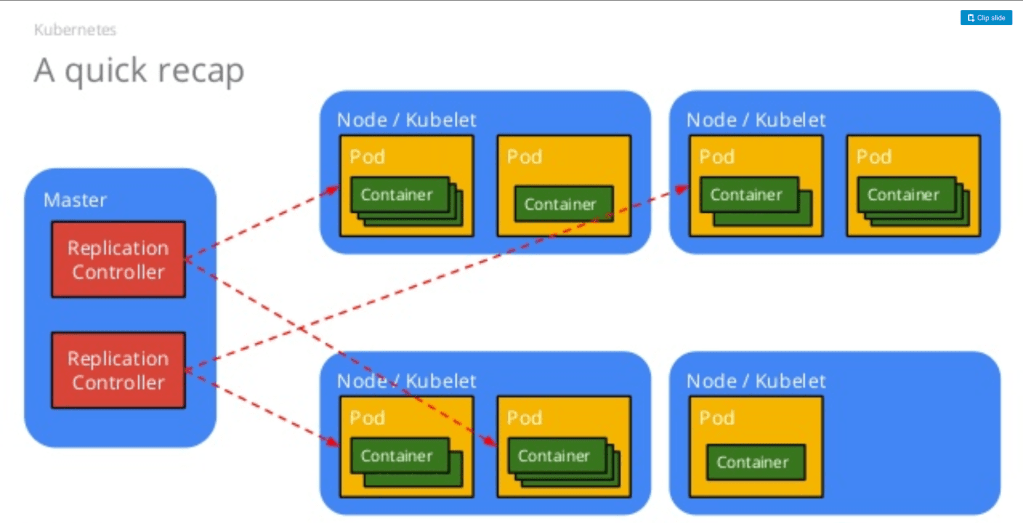
Taken: 30/09/2020
As you can see each node can have a varying number of pods with a varying amount of containers running within them. The master has replication controllers which ensure the right nodes, pods and containers are running and tracks any changes to this through a history. So lets say you create 3 copies but you actually need 5, you make 5 and then need to revert back to 3, you can easily do so because of this replication controller. Or you deploy version 2 but need to reverse back to version 1 the replication controller takes care of this.
Deployment
To use Kubernetes you need to install Kubernetes and include a Deployment.yaml (or .json) file. This file specifies how you’d like to deploy your application and declares the desired state you want.
apiVersion: apps/v1
kind: Deployment
metadata:
  name: nginx-deployment
  labels:
    app: nginx
spec:
  replicas: 3
  selector:
    matchLabels:
      app: nginx
  template:
    metadata:
      labels:
        app: nginx
    spec:
      containers:
      - name: nginx
        image: nginx:1.14.2
        ports:
        - containerPort: 80
The above is an example for running 3 replicas of nginx. Note how it specifies a Deployment for the key ‘kind’. Inside your Deployment.yaml file you can declare any kind of resource. Eg pod, service, container, replication controller. The main thing to note is that this created 3 replicas of the image specified inside one container.
You can run the above Deployment yourself with the following command:
kubectl apply -f https://k8s.io/examples/controllers/nginx-deployment.yamlCheck if this was successful with
kubectl get deployments PRJ701 Blog - Gijs